
Table of Contents
Starlink Standby Mode Makes Vacation Homes Way Easier (and Cheaper) to Keep Connected
If you own a vacation home or second home, you already know the internet problem.
You want the place online year round for thermostats, cameras, and smart locks.
You do not want to pay full price year round for a connection you only use a few months.
If you fully suspend cable or fiber, many providers stop all data, so your smart home goes dark.
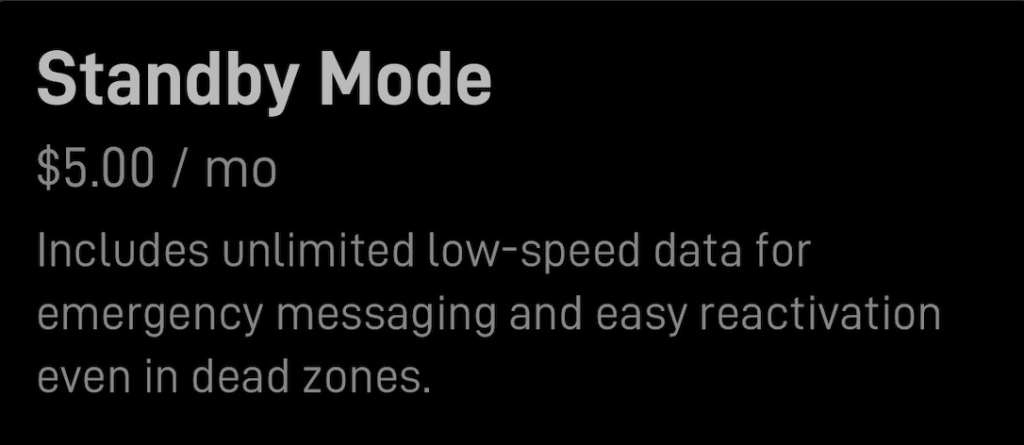
A new Starlink option called Standby Mode is a really practical middle ground. It keeps your Starlink online with unlimited low speed data for a small monthly fee, and you can switch back to a full speed plan when you arrive.
Check if your address qualifies and get a free month (of regular service)
What is Starlink Standby Mode?
Standby Mode is essentially a “keep it connected” setting.
When you pause service using Standby Mode:
- Your dish stays connected with unlimited low speed data, intended for emergency messaging and light connectivity
- Speeds are severely limited
- You can later resume high speed service and choose a plan that is available in your area
This is not designed for streaming TV, work calls, or anything bandwidth heavy. Think always on trickle, not primary internet.
Real world speeds in Standby Mode (from our tests)
We ran speed tests while in Standby Mode and the results confirm what many users are seeing.
From the speed tests you provided:
- Download: 0.33 to 0.55 Mbps (about 330 to 550 Kbps)
- Upload: 2.10 to 4.21 Mbps
- Ping: 32 to 45 ms
That is nearly never enough for streaming. It can be enough for smart home control and occasional basic check ins.
Why this is perfect for vacation homes
1) Your smart home stays alive while you are away
Most smart home tasks use tiny bursts of data:
- Adjusting a thermostat
- Checking door lock status
- Receiving leak sensor alerts
- Confirming alarm status
- Opening or closing a garage door
Standby Mode is often plenty for these heartbeat type needs.
2) Cameras can work, but set expectations
If you want to pull up a live HD feed anytime you want, Standby Mode may be frustrating.
What usually works better on Standby Mode:
- Motion alerts and notifications
- Low resolution thumbnails
- Short, low bitrate clips
- Cameras that record locally and only send alerts remotely
What usually does not work well:
- Smooth live viewing of multiple cameras
- High resolution continuous cloud recording
If cameras are your main reason for always on internet, the best setup is often local recording onsite with remote alerts and occasional check ins.
3) Turn it up when you arrive
When you are actually at the property, you can switch back to a regular high speed plan to stream, work, and browse normally.
When you leave, put it right back into Standby Mode.
The money comparison: Starlink vs cellular vs cable
Prices vary by location, discounts, and availability, but the pattern is consistent.
Starlink Standby Mode
This is the big headline.
Standby Mode is around $5 per month in many markets, and it provides unlimited low speed data. For a second home that only needs smart home access while you are away, that can be hard to beat.
Cellular options (5G home internet or a router data plan)
If the location has strong cellular coverage, cellular can be a great solution, but it is rarely a $5 per month solution.
Typical home internet plans from major carriers often land in the $35 to $60 per month range depending on provider, plan, and discounts.
Cellular is great when:
- You want a simple monthly bill and decent speeds
- You have strong signal and consistent performance at that address
Cellular is not as great when:
- Coverage is weak or congested, especially during peak times
- You need a solution that works in more remote areas
Cable or fiber with “vacation mode”
Cable and fiber can be fast and reliable, but the vacation mode problem is real.
Many providers allow you to place your service in a seasonal hold, but that often means your internet data is effectively off. No data means no thermostat control, no smart locks, and no remote camera access.
That is why Standby Mode can be such a strong fit for second homes. You can keep a trickle of connectivity without paying for full speed service year round.
Why you should choose the Residential dish instead of the Mini for a second home
The Starlink Mini is excellent for portability, but for a second home, the residential style setup usually gives you more flexibility across service plan options.
If your goal is a fixed location second home where you may want a full speed residential plan when you are there, the residential dish is often the safer choice because it tends to have the broadest plan compatibility.
A simple second home playbook
When you leave
- Switch your Starlink service to Standby Mode
- Keep Starlink powered so it stays online for your smart home devices
- Use a small UPS to ride through short power blips if reliability matters
While you are away
- Use Standby Mode for thermostats, locks, sensors, and occasional check ins
- If you have cameras, prioritize local recording and remote alerts over live viewing
When you return
- Switch back to a full speed plan for the stay
- Stream, work, and browse normally
- When it is time to leave, switch back to Standby Mode again
One important note: switching plans does not guarantee plan availability in every location at all times. In high demand areas, you may have fewer plan choices.
Bottom line
For vacation homes and second homes, Starlink Standby Mode can be the best of both worlds.
You can keep your property connected for smart home control at a very low monthly cost while you are away, then switch back to full speed internet when you arrive.
If you want help dialing in the best setup for your second home, tell me what you need while you are away (thermostat only, cameras, smart locks, alarm system) and whether cellular is strong at that location.
Check if your address qualifies and get a free month (of regular service)
Download Free Starlink Support PDF
FAQ
What is Starlink Standby Mode, and what does it cost?
Starlink Standby Mode is a low cost option designed to keep your Starlink connection active with unlimited low speed data while you are away from a property. In many markets it is about $5 per month. It is ideal for basic connectivity needs like smart home monitoring and control, not full home internet use.
What speeds should I expect in Standby Mode?
Standby Mode is severely speed limited. In our speed tests, we saw about 0.33 to 0.55 Mbps download (roughly 330 to 550 Kbps) and about 2.10 to 4.21 Mbps upload. That is usually enough for smart home devices and occasional check ins, but not enough for streaming or heavy browsing.
What will work in Standby Mode at a vacation home?
Standby Mode is a strong fit for light usage such as thermostat adjustments, smart lock status, alarm notifications, leak sensor alerts, and checking basic camera alerts. If you use cameras, you will get the best results with local recording and remote alerts, rather than relying on smooth live video.
Can I stream TV or work remotely while in Standby Mode?
Usually no. The download speeds are typically too low for streaming services and video meetings. If you are at the vacation home and want to stream, browse, and work normally, you should switch back to a full speed plan like Residential or Roaming for the duration of your stay.
How do I switch plans when I arrive or leave?
How do I switch plans when I arrive or leave?
When you leave, change your service to Standby Mode in your Starlink account to reduce the monthly cost while keeping basic connectivity. When you return, resume service and select a full speed plan for that location. Before you leave again, switch back to Standby Mode. Keep in mind that plan availability can vary by location, especially in high demand areas.
