
Table of Contents
Choosing the Right Peplink Antenna: What Actually Matters (and Why It Can Outperform a Modem Upgrade)
When people troubleshoot slow or unreliable cellular connectivity, they often jump straight to the modem or carrier. In Peplink’s webinar on antenna selection, the big takeaway was simple: antenna choice is just as critical as modem choice, and the right antenna setup can make an average modem perform dramatically better in the real world.
This guide breaks down what actually matters when selecting a Peplink antenna, with practical examples, common mistakes to avoid, and a simple framework you can use for vehicles, buildings, and maritime deployments.
Why Antennas Matter More Than You Think
A cellular modem can only work with the signal it receives. A quality antenna can:
- Pull in cleaner signal (better stability and throughput)
- Improve both transmit and receive performance (gain works both ways)
- Reduce noise and interference (especially with directional antennas)
- Eliminate avoidable signal loss (often caused by coax and connectors)
In the webinar, Peplink shared real-world cases where the right antenna turned “barely usable” into “production ready”, including a basement deployment jumping from about 1 Mbps to 300+ Mbps after switching antennas.
Understanding Antenna Gain (dB) Without the Marketing Hype
Antenna gain is measured in dB, and one of the most important points from the webinar is this:
dB gain is exponential, not linear.
As a rough rule of thumb:
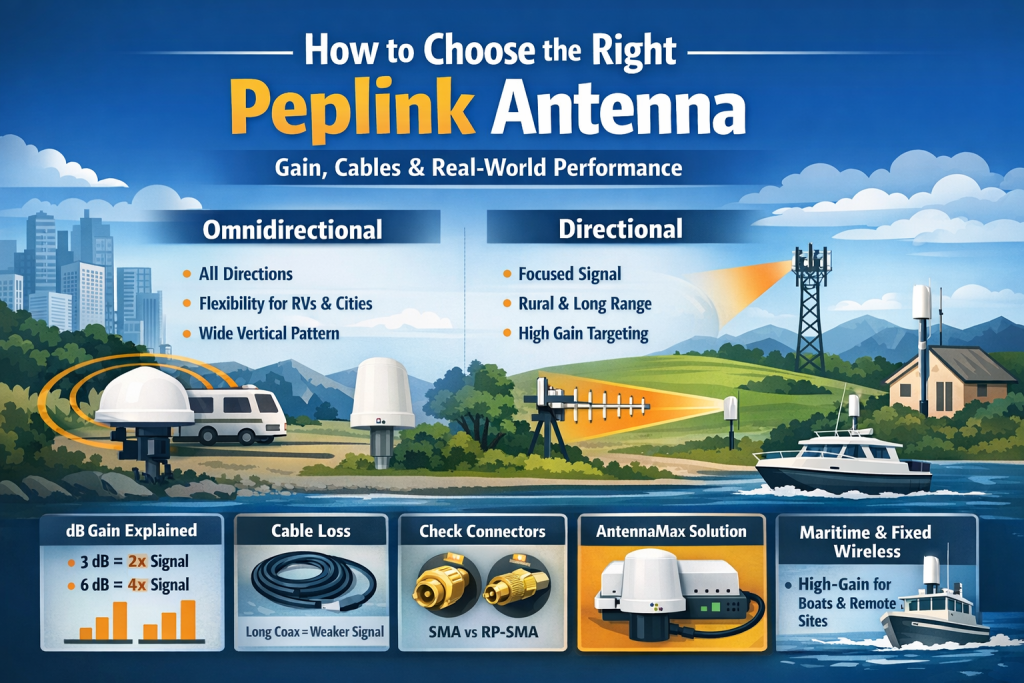
- +3 dB ≈ doubles signal strength
- +6 dB ≈ about 4x
- +13 dB ≈ about 20x compared to 0 dB
Also, small-looking changes can be meaningful. Going from 4.5 dB to 5.6 dB might not sound like much, but because dB scales exponentially, that “small” increase can be a real upgrade.
0 dB is not “bad”
0 dB is essentially a baseline radiator, think “a piece of wire.” Higher gain is not automatically better, because gain comes with trade-offs in antenna pattern (especially for omnidirectional antennas).
Omnidirectional vs Directional: Which One Should You Choose?
Omnidirectional antennas (omni)
Radiate in all directions, which makes them ideal when:
- You are moving (RVs, fleet vehicles, first responder vehicles)
- Towers are in multiple directions (urban and suburban)
- You want flexibility without aiming
Trade-off: As omni gain increases, the vertical pattern gets narrower. A high-gain omni can become “flatter,” which can be a problem in hilly terrain, parking structures, or areas where towers sit at different elevations.
Example from the webinar: a 9 dB omni can struggle with elevation changes because its vertical coverage can get too tight.
Directional antennas
Focus energy in one direction, which makes them ideal when:
- You are fixed in place
- Towers are far away (rural fixed wireless)
- You want longer range and reduced interference
Trade-off: Directional antennas can be misaligned easily. If the mounting shifts, performance can drop quickly.
A simple rule
- Mobile deployments: start with omni
- Fixed rural deployments: consider directional
- Noisy urban environments: directional can help isolate a cleaner tower path
Frequency Bands and Attenuation: Range vs Speed (and the Myth That Low Band Is “Slow”)
Signal behavior changes dramatically across frequency ranges:
- Low band (600 to 960 MHz): best for range and building penetration
- Mid band (1400 to 2700 MHz): balanced range and throughput, great for suburban deployments
- High band (3400 to 4200 MHz): high capacity, shorter range, common in dense areas
- Ultra high band (5100 to 6000 MHz): maximum throughput potential (Peplink referenced up to 1.3 Gbps), but attenuation is aggressive
Key lesson: higher frequencies attenuate faster. A 6 GHz signal generally degrades much quicker through walls and distance than a 700 MHz signal.
Also, modern 5G changed the old assumptions. Low band 5G (like n71) can now deliver hundreds of Mbps, so “low band equals slow” is outdated.
The Silent Performance Killer: Cables, Connectors, and Signal Loss
One of the most important parts of the webinar was this: your antenna gain can disappear in the cable run.
Peplink used a clear example:
- RG174 can lose around 3.5 dB per 10 feet at 900 MHz and nearly 5 dB per 10 feet at 2000 MHz
- That means a 5 dB antenna can effectively behave like a 1 dB antenna after just 10 feet of the wrong coax
By comparison:
- LMR400 was cited at roughly 0.6 dB and 0.4 dB loss per 10 feet at those same frequencies (far better)
Practical cable guidance (from the webinar)
- RG174: up to ~15 to 16 feet
- RFD200: up to ~30 feet
- LMR400: up to ~80 feet
- LMR600: up to ~160 feet
Best move when you have long runs
If you need distance between the antenna and your network gear, Cat6 with PoE antenna solutions eliminate RF loss over long runs.
Why Peplink AntennaMax Is a Big Deal (PoE Instead of Coax)
AntennaMax is designed to eliminate coax losses by housing the router inside the antenna enclosure, then using a single Cat6 PoE cable for power and data.
Benefits:
- No RF signal loss from long coax runs
- Cleaner installs (especially for rooftop, mast, and outdoor deployments)
- Easier upgrades from indoor routers to outdoor use without weatherproofing headaches
- Fewer failure points (connectors, adapters, splitters, coils)
In the webinar, AntennaMax field results were described as “insane” largely because it removes cable loss and improves overall antenna efficiency.
Connector Confusion: The Mistake That Can Cause “Zero Signal”
This is a very real gotcha, especially when mixing WiFi and cellular accessories.
Common connector types
- RP-SMA: commonly used for WiFi
- SMA: commonly used for cellular and GPS
- QMA: locking mechanism instead of threads (often used in commercial setups)
A key warning from the webinar:
If you connect a WiFi antenna (RP-SMA male with a hole) to a cellular port (SMA female with a hole), you can end up with no connection because both sides are “hole to hole.”
If you are ever unsure, stop and verify connector type before you mount everything permanently.
The Five Peplink Antenna Categories (and When to Use Each)
Peplink groups antennas into five main categories, each built for a specific type of deployment.
1) AntennaMax Series (router inside, PoE out)
Best when you want maximum performance with minimal RF loss.
- AntennaMax S supports portable and job site designs, including Starlink Mini plus a single 5G radio in one enclosure
- AntennaMax Duo supports dual 5G routers like BR2 Pro with more cellular elements
2) Mobility Series (vehicle omni, ruggedized)
Designed for fleets, public safety, RVs, and mobile IoT.
- Mobility 42G: popular all-around model with cellular, WiFi, and GPS in a compact form factor
- Mobility 82G: more cellular elements for dual 5G use cases
These are built to maintain high gain while keeping a wide vertical pattern that works while moving.
3) Slim Series (covert, window or wall mount)
Ideal when you cannot or do not want to drill into a roof.
- Low profile
- 3M adhesive mounting
- Options for 4G and 5G MIMO configurations
4) Maritime Series (high-gain, challenging environments)
Peplink framed these as a “break glass” solution for tough signal situations.
- Taller designs can deliver higher gain while still maintaining enough vertical coverage for boat movement
- Used successfully to dramatically improve performance in difficult indoor environments when outdoor mounting was not allowed
5) Dome Series (all in one router plus antenna)
Best when you want a single integrated solution for simplicity, especially for vehicles and outdoor environments.
Real-World Scenarios That Make Antenna Choice Obvious
Here are practical examples discussed in the webinar, translated into simple selection logic:
RVs, fleet vehicles, and mobile work sites
- Omni is usually the right starting point
- Mobility antennas are designed to keep stable performance while moving
- For portable job sites, AntennaMax S plus PoE can create a clean “grab and go” connectivity kit
Fixed wireless in rural areas
- Directional can be a major advantage when towers are far away
- Omni can still work when tower direction is unclear or changes
Concrete buildings, basements, and “no drilling allowed” installs
- When you cannot go outdoors, a high-gain solution like Maritime mounted indoors in the best possible position can be the difference between unusable and productive
Offshore and maritime connectivity
Two key realities:
- Earth curvature limits distance at low elevation
- You need antenna height on a mast for longer reach
- You also need an antenna pattern that handles boat motion
A common best practice: combine cellular and Starlink.
- Use 5G near shore to save satellite bandwidth cost
- Switch to Starlink when leaving coverage, ideally seamlessly
Best Practices Checklist (Do These First)
Before you spend money on a new router or carrier plan, check these fundamentals:
- Use the shortest coax run possible
- Avoid splitters unless you have a clear design reason
- Minimize connector count (each connection is potential loss)
- Separate antennas properly (the webinar recommended about 12 to 18 inches)
- Do not coil excess cable behind cabinets just to “standardize” length
- Verify connectors (SMA vs RP-SMA vs QMA)
- Watch VSWR: if it is too high, it can permanently damage cellular modems
- Prioritize antennas that publish real efficiency data, not vague marketing
5Gstore Take
Antenna upgrades are one of the most overlooked ways to improve real-world cellular performance. The best modem in the world cannot overcome poor RF fundamentals, and the most common issues we see are not carrier related, they are cable loss, connector mismatches, and antenna selection that does not match the deployment.
If you tell us your use case (vehicle, building, rural fixed wireless, or maritime), your router model, and your mounting options, we can help you pick the antenna category and cable approach that delivers the biggest improvement per dollar. Need help? Contact 5Gstore.
FAQ: Peplink Antenna Selection
Does a higher dB antenna always mean better performance?
Not always. Higher gain can narrow the antenna pattern, especially for omnidirectional antennas. That can hurt performance in changing elevation or mixed tower environments.
Should I use omnidirectional or directional for my router?
Omni is usually best for mobility and multi-tower areas. Directional is best when you are fixed in place and targeting distant towers, or when you need to reduce interference.
How much does coax cable really matter?
A lot. With the wrong cable, you can lose multiple dB in a short run, effectively wiping out the gain you paid for.
What is the main benefit of AntennaMax?
It eliminates coax signal loss by placing the router inside the antenna enclosure and using Cat6 PoE for power and data.
Can using the wrong connector cause zero signal?
Yes. A common mistake is mixing RP-SMA WiFi antennas with SMA cellular ports, which can result in “hole to hole” connections and no signal path.
Why should I avoid cheap antennas?
Because antenna performance depends heavily on efficiency, build quality, and real engineering. If specs are vague or efficiency is missing, you are taking a gamble.
